
Ceci est une ancienne révision du document !
Table des matières
Compilation depuis les sources
Pour ubuntu 16.04
sudo apt-get install libpython3-dev libpython3.5-dev libopenimageio-dev  libopenimageio1.6 openimageio-tools libopenimageio-doc python-openimageio cmake libx11-dev libjpeg-dev libpng12-dev libz3-dev libfreetype6-dev libboost-all-dev libglew-dev libopenexr-dev libopenjpeg-dev libopenal-dev python3-numpy libjemalloc-dev
wget http://download.blender.org/source/blender-2.77a.tar.gz
tar xvf ../blender-2.77a.tar.gz
mkdir cmake-make
cd cmake-make
cmake ../blender-2.77a/
make -j4
sudo make install
Pour ubuntu 14.04:
Nous avons eu des problèmes de compilation, dus à des problèmes de version de librairies, il est nécessaire d'avoir: cmake 3.2 et python 3.5
Après essai infructueux de:MAJ CMake 3.2 , nous sommes passé en 16.04
Scene blender camera Rolling
Enregistrement date associée à chaque rayon
modification des sources blender pour gérer le modèle caméra rolling: https://developer.blender.org/D1624
fichier: intern/cycles/kernel/kernel_camera.h
- c
			ray->time += (time - 0.5f) * (1.0f - duration) + 0.5f;
			}
			else {
				ray->time = time;
			}
//BVDP
FILE *f;
f=fopen("test.bv","a");
fprintf(f,"%d , %d , %lf\n", x,y,(double)ray->time);
fclose(f);
//!BVDP
		}
	}
#endif
	/* sample */
	if(kernel_data.cam.type == CAMERA_PERSPECTIVE)
		camera_sample_perspective(kg, raster_x, raster_y, lens_u, lens_v, ray);
	else if(kernel_data.cam.type == CAMERA_ORTHOGRAPHIC)
Interpolation réalisée par blender
Le code pour rolling shutter est à la ligne (l322) dans intern/cycles/kernel/kernel_camera.h Le calcul du temps correspondant à chaque partie du rendu est fait par:
ray->time = (ray->time - 0.5f) * duration;
la demande de rendu à cet instant par:
if(kernel_data.cam.type == CAMERA_PERSPECTIVE)
  camera_sample_perspective(kg, raster_x, raster_y, lens_u, lens_v, ray);
En (l42) on trouve la fonction de calcul du rayon primaire:
ccl_device void camera_sample_perspective(KernelGlobals *kg, float raster_x, float raster_y, float lens_u, float lens_v, ccl_addr_space Ray *ray)
Pour l'interpolation des matrices caméras (en cas de changement des paramètres intrinsèques):
if(kernel_data.cam.have_perspective_motion) {
Pour l'interpolation des matrices de pose:
if(kernel_data.cam.have_motion) {
  #ifdef __CAMERA_MOTION__
    if(kernel_data.cam.have_motion) {
  #ifdef __KERNEL_OPENCL__
    const MotionTransform tfm = kernel_data.cam.motion;
    transform_motion_interpolate(&cameratoworld,((const DecompMotionTransform*)&tfm), ray->time);
  #else
    transform_motion_interpolate(&cameratoworld,((const DecompMotionTransform*)&kernel_data.cam.motion), ray->time);
  #endif
L'interpolation de pose est réalisée par la fonction transform_motion_interpolate dans intern/cycles/util/util_transform.h (l410)
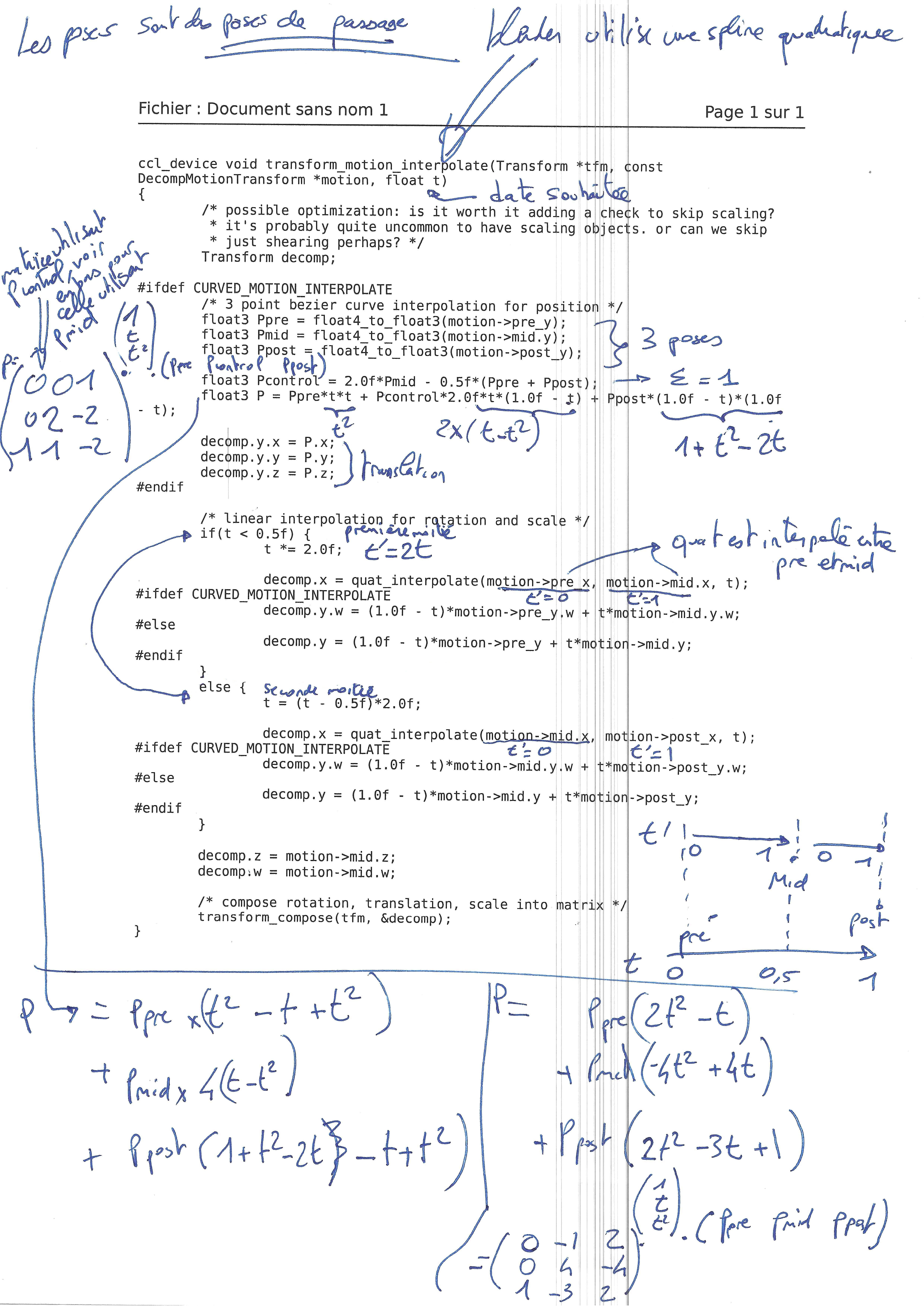
Pour l'interpolation des quaternions, elle utilise:
ccl_device_inline float4 quat_interpolate(float4 q1, float4 q2, float t) (l317)

Modèle de caméra
Pour les réglages de caméra sous blender, voir: https://en.wikibooks.org/wiki/Blender_3D:_Noob_to_Pro/Understanding_the_Camera
Matrice caméra: 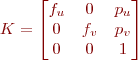
Sous blender les caméras sont gérées avec des pixels carrés ( ) et définies soit par une focale en mm soit par un champ de vision en degrés.
Exemple pour une image générée de 1920*1080 pixels
La position du point principal au centre de l'image, pour un indicage des images type C (pixel coin haut gauche en 0.0):  et
et 
Le calcul des focales pixelliques se fait ainsi:
- pour une focale 35mm correspondant à une dimension horizontale de capteur de 32mm affichant 1920 pixels:
 pixels
 - pour un champ de vision horizontal de 49.134 degrés. De chaque coté du point principal, il y a 960 pixels pour 24.567 degrés:
 , soit
  pixels
Paramètre extrinsèques
Attention, les caméras blender pointent vers les Z négatifs, il faut donc ajouter une rotation de 180° à la matrice rotation. Todo jessica: compléter.
Export des données Zmap
TODO pour jessica: expliquer le processus de création de la chaine de rendu pour générer les zmap au format openExr.
http://www.cs.tut.fi/kurssit/SGN-5406/vrlab2012/blender-manual.pdf
http://blender.stackexchange.com/questions/33293/z-buffer-output-from-blender-as-file
https://www.blender.org/manual/render/blender_render/layers.html#
Pour l'exploitation des images au format openExp, voir la page openexr.
Rendu depuis un script python
Utiliser l’interpréteur python intégré à blender depuis la ligne de commande
blender --python test.py
- test.py
import bpy
import numpy as np

import sys

# switch on nodes
bpy.context.scene.use_nodes = True
tree = bpy.context.scene.node_tree
links = tree.links

# clear default nodes
for n in tree.nodes:
    tree.nodes.remove(n)

# create input render layer node
rl = tree.nodes.new('CompositorNodeRLayers')
rl.location = 185,285

# create output node
v = tree.nodes.new('CompositorNodeViewer')
v.location = 750,210
v.use_alpha = False

# create output node
of_c_node = tree.nodes.new('CompositorNodeOutputFile')
of_c_node.location = 600, 200
#of_node.base_path =
of_c_node.format.file_format = 'PNG'

# Links
links.new(rl.outputs[0], v.inputs[0])  # link Image output to Viewer input
links.new(rl.outputs[0], of_c_node.inputs[0])

# Define path where to save image
of_c_node.base_path = "./images_test_png"

# render
bpy.ops.render.render()

# get viewer pixels directly
pixels = bpy.data.images['Viewer Node'].pixels
print(len(pixels)) # size is always width * height * 4 (rgba)

# copy buffer to numpy array for faster manipulation
arr = np.array(pixels[:])
print('one pixel \n',arr[100:104])

#exit blender
sys.exit(0)
Installation blender sur compte utilisateur d'une machine du LAAS et utilisation à distance
ssh  bvandepo@cuda.laas.fr
wget http://homepages.laas.fr/bvandepo/files/blender/blender-2.74-linux-glibc211-x86_64.tar.bz2
tar -jxvf blender-2.74-linux-glibc211-x86_64.tar.bz2
rm  blender-2.74-linux-glibc211-x86_64.tar.bz2
cd  blender-2.74-linux-glibc211-x86_64
./blender
Utiliser l'option -b pour désactiver le rendu openGL. Par exemple pour éxecuter un script python:
./blender --python test.py -b
Pour lancer le rendu à distance:
ssh -t bvandepo@cuda.laas.fr "cd blender-2.74-linux-glibc211-x86_64 && ./blender --python test.py -b"
Copier la clef publique rsa pour ne pas avoir à saisir le mot de passe à chaque connexion
script python détaillé
Le script suit les étapes suivantes :
- sélection de l'outil GPU : Il faudra vérifier au préalable le type de votre carte graphique. “compute_device_type” peut être “CUDA”, “OpenCL”, “NONE” et “device” peut être “CPU” ou “GPU” voir https://docs.blender.org/manual/en/dev/render/cycles/gpu_rendering.html.
- initialisation de blender : suppression des objets par défaut (modèle du cube, la lampe et la caméra)
- ajout d'objets : modèles 3D, caméras, lampes. Plus tard, ces objets pourront être appelés avec bpy.data.objects['nom_de_ton_objet'] où 'nom_de_ton_objet' peut être 'Plane', 'Camera'.
- ajout de matériaux : les matériaux seront paramétrés comme avec l'interface de blender. Auparavant, Il est préférable de tester sur l'interface les choix de “texture_coords” et “mapping”.
- Initialisation de l'outil node : pour faire des images de profondeur enregistrées sous format openexr, il est nécessaire d'activer l'outil node de blender.
- Définition de la résolution des images rendues
- Choix de la caméra utilisée pour le rendu
- Rendu
- sample_code_complete.py
import bpy
import numpy as np
import os
import sys


#****** CREATE DIRECTORY WHERE TO SAVE IMAGES ***********
img_dir = '/tmp/images/'
if not os.path.exists(img_dir):
    os.makedirs(img_dir)

#****** SET GPU AS DEVICE ***********
# Before check your gpu compute device type
ver = bpy.app.version[0]*1000 + bpy.app.version[1]*10 + bpy.app.version[2]
if ver < 2782 :
# Before blender 2.78b
	bpy.context.scene.cycles.device = 'GPU'
	bpy.context.user_preferences.system.compute_device_type = 'CUDA'
else :
# Since blender 2.78b
	sysp = bpy.context.user_preferences.addons['cycles'].preferences
	sysp.compute_device_type = 'CUDA'
	bpy.context.scene.cycles.device = 'GPU'


#****** INITIALIZE THE BLENDER 3D WORLD ********
# gather list of items of interest.
candidate_list = [item.name for item in bpy.data.objects if item.type == "MESH" or item.type == "LAMP" or item.type == "CAMERA"]

# select them only.
for object_name in candidate_list:
    bpy.data.objects[object_name].select = True

# remove all selected.
bpy.ops.object.delete()

# remove the meshes, they have no users anymore.
for item in bpy.data.meshes:
    bpy.data.meshes.remove(item)

# delete all materials
for i in bpy.data.materials.values():
    bpy.data.materials.remove(i)

# delete all textures
for i in bpy.data.textures.values():
    bpy.data.textures.remove(i)

# delete all images
for i in bpy.data.images.values():
    # delete image path, this is only possible without a user
    i.user_clear()
    # delete all, except »Render Result«
    if i.name != "Render Result":
        bpy.data.images.remove(i)

#****** ADD OBJECTS ********
# Add a mesh
bpy.ops.mesh.primitive_plane_add(location=(0,0,0), radius=1.75)
plane = bpy.data.objects['Plane']

# Add a camera
bpy.ops.object.camera_add( location = ( 1.5, 0, 5), rotation = ( 0,0.3,0 ) )

# Add a lamp
bpy.ops.object.lamp_add( location = ( 1.0, -1.0, 6.0 ), type = 'POINT' );

#****** ADD MATERIALS *********
# create material
plane_material = bpy.data.materials.new("skin_material") # new material
plane_material_texture = plane_material.texture_slots.add() # add texture slot to material
plane_material.specular_intensity = 0.0

# edit texture
plane_image_path = os.path.expanduser('~/DiversTools/dataset/gt/image_texture/frame0000.jpg') # get image (needs the lib os)
plane_image = bpy.data.images.load(plane_image_path) # load image

# create texture
plane_texture = bpy.data.textures.new("plane_texture", type = 'IMAGE') # create texture type "image"
plane_texture.image = plane_image # link picture to image

# link texture and material
plane_material_texture.texture = plane_texture
plane_material_texture.texture_coords = 'UV'
plane_material_texture.mapping = 'FLAT'

# prepare object
bpy.context.scene.objects.active = plane # select pyramid object
bpy.ops.object.mode_set(mode='EDIT') # switch to edit mode
bpy.ops.uv.smart_project() # automatically unwrap object
bpy.ops.object.mode_set(mode='OBJECT') # switch back to object mode
plane.data.materials.append(plane_material) # link material to object

#************* INIT NODE COMPOSITOR FOR DEPTH RENDERING ***********
# switch on nodes
bpy.context.scene.use_nodes = True
tree = bpy.context.scene.node_tree
links = tree.links

# clear default nodes
for n in tree.nodes:
    tree.nodes.remove(n)

# create input render layer node
rl = tree.nodes.new('CompositorNodeRLayers')
rl.location = 185,285

# create output node for color image
out_c_node = tree.nodes.new('CompositorNodeOutputFile')
out_c_node.location = 600, 200
out_c_node.format.file_format = 'PNG'

# create output node for z map
out_z_node = tree.nodes.new('CompositorNodeOutputFile')
out_z_node.location = 600, 400
out_z_node.format.file_format = 'OPEN_EXR'

#links
links.new(rl.outputs[2], out_z_node.inputs[0])  # render node to output file for Z image
links.new(rl.outputs[0], out_c_node.inputs[0])  # render node to output file for color image

#************* RENDER AND SAVE IMAGES ***********
# Define image resolution for rendering
bpy.data.scenes["Scene"].render.resolution_x = 250
bpy.data.scenes["Scene"].render.resolution_y = 250
# resolution percentage : have to be 100% to have the whole image resolution defined earlier
bpy.context.scene.render.resolution_percentage = 100

# Activate which camera will be used for rendering
# (if more than one camera are defined, the rendering have to be repeated for each camera)
bpy.context.scene.camera = bpy.data.objects["Camera"]

# Define path where to save images
str4 = img_dir + "image"
out_c_node.base_path = str4 + "000"
out_z_node.base_path = str4 +"_Z_"+ "000"

# Render
bpy.ops.render.render()#write_still=True)

#************* EXIT BLENDER  ***********
sys.exit(0)